|
|
       |
 |
The Absolute Essentials! |  |
Before you run OneKaraoke for the first time, we strongly recommend you spend a few minutes to read through the following condensed materials. It's definitely worthwhile to know the basics! And make sure you read and understand the License Agreement first. |
||
 |
 | |
|
Content Preparation & Conversion | |
|||||||||||||||
To make good use of OneKaraoke, it’s a good idea to get some content into your computer. There are many sources of content and many tools to help you do just that. Different content sources have different methods of conversion, as described below. Before you move onto next section you should have some content ready in your PC!
|
|||||||||||||||||
|
|
||||||||||||||||
|
Organizing Content in OneKaraoke (Basics) | | |||||||
|
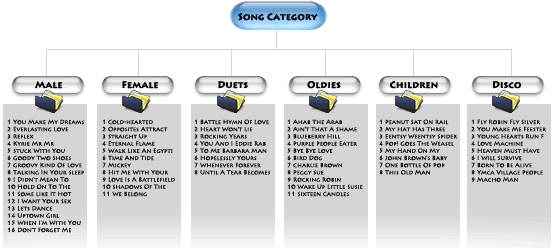
OneKaraoke adopts a single-level song categorizing structure for easy content management. To illustrate the concept of single-level hierarchy, let’s take a look at an example of one's song categorization (Left-hand Diagram below):
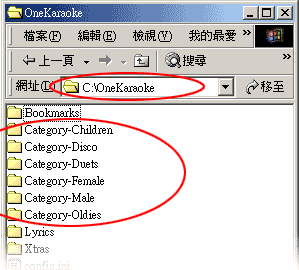
In the above example, there are six song categories defined by user: - Male, Female, Duets, Oldies, Children, Disco ( In another instance, user may define these as Madonna, Westlife, Phil Collins, Elton John, etc. The nomenclature is entirely up to you!). So how is this categorization represented in the hard disk in relation to the karaoke files? The secret lies in the folder installed as C:\OneKaraoke\, where any folder named as Category-XXXX is automatically known to OneKaraoke as the song categories. These folders are stored in the directory C:\OneKaraoke\ as in the Right-hand Diagram above. The content (mpg, avi, wmv, etc.) should be placed in respective folders named as Category-XXXX as in the above. On launching, OneKaraoke will
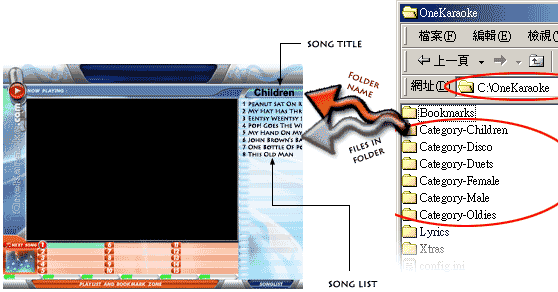
The following diagram explained the relationship of this folder arrangement with the user interface.
That's all you need to know for song management for now. Let's get some songs organized now! |
|||||||||
|
| ||||||||
|
Using OneKaraoke (with PC Keyboard) | |
||||
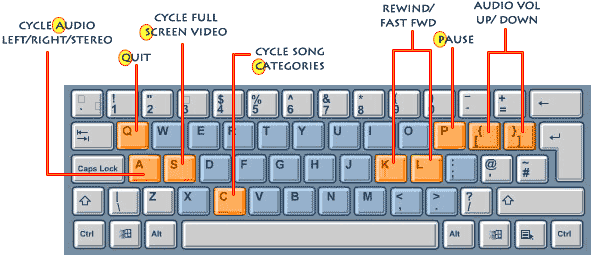
After OneKaraoke is launched, put the mouse aside since all functions are hotkey-operated. To control OneKaraoke with PC Keyboard, refer to the key map below:
|
||||||
| Now that you know the basics of OneKaraoke, why not start having fun now and read the user manual later! Remember we are here to help if you come across any problem! | ||||||
|
|
|||||